
I am pleased to announce that we have ten new Help Desk Students and one returning student (Sarim Sajid, whose bio can be found here) on the Help Desk for the second semester. We have a wide range of abilities and talents in our second group. Some of their interests include journalism, film and media editing and production, game development, and online e-commerce. I’m every excited to see how they’ll support BHS on the Help Desk and with the various projects they’ll be doing this semester. Here are the biographies for our very talented second semester staff.
 My name is Bilal Afzal. I am a junior and I wanted to join the help desk because I share an interest in technology and science. I know that by working at the help desk I will be helping out students and teachers with technology related issues and helping them understand and use it to their advantage. This brings me to what I aspire to become which is a doctor. Since I was kid I knew that by being a doctor I will be able to help other people who have life threatening or even simple problems. Some of my interests are drawing, reading, Star Wars, science, and a little philosophy. I also enjoy learning about technology and hope to learn more by working with other people and expand my knowledge.
 Hello, my name is Paul Barbieri. I am currently a junior here at Burlington High School. What really interests me is sports. I play hockey and lacrosse here at Burlington High School and love being on a team with all of my close friends. I decided to join Help Desk because I really do not work well with technology and I really hope to change that and be able to help you with your technology problems. After high school, I will most likely join the military. However, after the military, I hope to become a state police officer here in Massachusetts. Some other things that might interest you are that I am on the boys' varsity hockey team. Also, I don’t play lacrosse competitively, I play more for fun so I am on the JV lacrosse team here at Burlington High school. Lastly, I have been in journalism since freshman year and expect to do it next year for my fourth and final year. I find helping people out is very enjoyable and journalism and Help Desk both allow me to do that, by helping people with their technology problems and by spreading recent news in the newspaper here at Burlington High School. I can’t wait for a fun semester ahead!
 My name is Katherine Ellis and I am a senior at Burlington High School. This is my first year taking Help Desk. Outside of school, I am very interested in cheerleading. I have done it for thirteen years and plan to continue it in college. Inside of academics, I am very interested in film and media production. I have taken two film classes at Burlington High School and plan to study creative media and film production as my major in college. I can see myself with a career in this field of work and I hope one day I can have a job with film production of some sort. I decided to join help desk because if I am going to be working with film, I am going to need a lot of knowledge about computers and electronics. This is a very good class for me to begin my studies about electronics and how they function with. I also joined help desk because I want to be able to help teachers and my classmates whenever they are having problems with their electronics in the classrooms. I look forward to learning about technology in Help Desk this semester!
 Hi, I’m Riley Gilberg and I am a senior at BHS. As a student athlete, I divide my time between practicing and school work. I play both Varsity Hockey and Varsity Lacrosse and these sports have been a passion of mine all of my life. For academics, I’m an honors student with an interest in business studies. When I’m not doing school or sports-related things, I’m often reading, spending time with friends and family, and running my company, Aboutime Watches.
I joined Help Desk because, as mentioned above, I recently started an online business, and during this process I was challenged with all sorts of online and technical barriers, setups and problems. By joining help desk I hope I can further my learning on any tech-related topics and also offer my knowledge to anyone who may need it. As far as technology goes, I have experience in website creation, search engine optimization, social media, photography, photo editing, general iOS interfaces, etc. As a senior, I’ll be attending Bentley University next year and look forward to studying business administration and entrepreneurship.
 Hello, My name is Dakota Irvine and I am a senior. As many of you know, I came to Burlington in the 7th grade. My interests consist of politics, history and current news. There is always enough going on in today’s society to stay interested.I decided to come to help desk to understand the school’s technology, but I also want to become more acquainted to technology in the developing world. You can almost say I came to class from under a rock because I am not very tech-savvy, but I am willing and eager to learn. I work with an iPhone and iPad like everyone else, but I am hoping to learn some tips and tricks to help others. I also play video games on PC and PS4, but I’m not too sure how that will give me an upper hand. My career interests consist of the military and law enforcement. I have grown up in a military family, so I just want to continue the tradition. I am fairly social and outgoing, especially when given the opportunity to help others.
  Hello, my name isAkash Kunchum, and I am a junior at BHS. I am interested in anything relating to technology, specifically computer engineering and video games. I decided to join the BHS Help Desk because aside from programming classes, there aren’t many other areas at BHS available for those who want to utilize and develop their skills in technology. I knew that by joining the Help Desk, I could do many things relating to my interests and help other people in the process. At the Help Desk, I hope to help improve the technological aspect of the school, either by assisting with problems involving technology or by solving the issues of other students who are looking for advice. In the future, my optimal career choice would be a video game designer, because I think that the video gaming industry is growing faster than most other industries out there, and I have a passion for playing and creating games. Aside from any technology-related information about myself, I also have a second-degree black belt in Kempo, Ju-Jitsu, and other mixed martial arts, and I have been practicing karate for six years now. I look forward to a great second semester at the BHS Help Desk!
 I am Brendan Lucas, a junior in Burlington High School, and I joined the BHS Help Desk because I am interested in technology and there is much I can learn from the Help Desk; I also know that in the Help Desk I can assist students and teachers with any problems they bring to us. I have experience with building computers and some experience with Java programming. I also have a lot of experience with Windows and related software. I have been interested in technology since a very young age. I have been on the swim team for two years and have played piano on and off since elementary school. My favorite kind of music to play or listen to is usually soundtracks from movies, shows and video games. I have always been very interested in philosophy but have become more recently interested in science and politics. I spend a lot of time coming up with theories or explanations for things, so I want to study science in college (probably chemistry) and do research as a career.
 What’s up? My name is Henry Lutwama. I’m a senior at Burlington High School and this is my second year on Help Desk. I will be working third periods and am excited to be part of this great team again. If you’re a tech guy then Help Desk is the right place for you to be because during the semester, you learn new things about tech you didn’t know and you get to help others with any technology troubles. When I joined the Help Desk last year, I wanted to help people with their tech issues and learn more about computers. My “techpertise” is more in Android devices than iOS although I’ve been trying to extend it so I got myself a couple of iOS devices. Technology has been part of me for my entire life and it’s something I’ve loved and wanted to get more integrated in, and because technology is so helpful in our society and especially in our schools because it gives you a variety of resources and students don’t have to rely on the teacher for information all the time. Besides technology, I also play soccer and rugby. Although soccer takes a bigger portion of my time, I prefer rugby and it’s more entertaining. After high school, I am thinking about majoring in computer engineering in college and to pursue a career in technology. In a world run by technology for all aspects of life, from efficient work operations and management to social networking connections, it is no surprise that information is the foundation of our collective future. That being said, you connect with me through my Twitter handle @henrylutwama and can reach me on email @henrylutwama57@gmail.com
 Hello, my name is Vibishan Wigneswaran and I am a junior in Burlington High School. Some of my hobbies consist of playing tennis, gymnastics, and PC building among others things. My incentive for joining Help Desk is the technological opportunities that it supports. Help Desk assists students in the production of team projects and other opportunities that are valuable after high school and beyond. Help Desk is valuable in its relation to my potential careers choices. Currently, I am inclined to pursue a career in engineering. Some interesting facts about me are that I have Canadian citizenship and play the euphonium and flute.
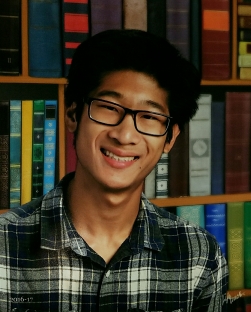 Hello, my name is Dan Xue, and I’m a junior in the Burlington High School. As a newcomer to Help Desk, I hope to become a valuable asset to the class through assisting students and teachers in their technological needs using my own experience. My interests include computer building, programming, graphical design, music, and swimming. I also closely follow politics, with a deep interest in modern world history. Aside from fixing problems with iPads, Chromebooks, and other various devices, I became a member of Help Desk in order to work in a personal development group, Cosmic Productions. Our current project involves using Java, Photoshop, and Sibelius, along with other integrative programs, to create and market a video game over platforms on both PC and console. I also hope to utilize the resources at BHS to create many more projects and activities and enhance the school’s relationship with technology. My career goal is to become an aerospace engineer, with a major in physics and engineering branches. If any teacher or student has questions about their devices, programs, or general tech, feel free to ask.


 pressing a key. Boys to the rescue!The following morning Barbie gives her sister her laptop and believes that it was her that fixed both laptops and not the boys. Following the return of the Skipper’s laptop, Barbie presents her cute puppy program to her teacher, who just so happens to be a woman. Barbie’s teacher is blown away by her work and gives her an A+ and even extra credit. Congrats Barbie, you’re clearly a computer engineer. Couldn’t write a program or fix two laptops but you drew a cute puppy and wore a cute top when you presented the game. So sure Barbie, you can be a “computer engineer”.









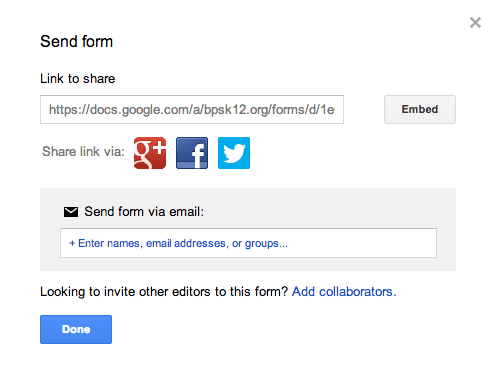 Benefits of Google Forms: