Click HERE to see this storyboard on StoryboardThat.com
The Broadcast
I had the honor of co-facilitating Help Desk Live episode 32 with my partner Shiv Shukla. In this episode, we interviewed Aaron Sherman the creator ofStoryboard That, a web-based tool in which you create custom storyboards that can be used for many purposes such as education, product development, and much more.
Aaron told us how he started Storyboard That and how he got to where he is today. His story is explained in the interview that you can watch for yourself below.
To summarize, Aaron worked at Vistaprint until 2012 when he broke off and began making a program that uses storyboards to organize your thoughts in a simple and concise format. The original Storyboard That was a Windows application used by businesses. The original version did not meet his expectations and he realized he had failed, so he tried again but this time he developed Storyboard That into a web based tool and it was soon discovered by educators thanks to the many blog posts by education blogger Richard Byrne. Storyboard That is now a widely recognized educational tool used by teachers and students of many content areas and grade levels.
Looking Back
He gave Shiv and I some very good advice, “Always take the job you’re most interested in. Research shows you’ll make far more money 3 years later if you take a job that you like then if you take a job that you don’t like that pays more money in a short term. Doing what you love no matter what it is, there is nothing better in life.” This line really gave me some insight on what starting a business is like and how important it is to be passionate about what you’re doing. Starting a business is hard, and this tells me that you need to be passionate about your product or it won’t go anywhere. I learned so much about entrepreneurship and how business works and I highly encourage all of you to watch this episode.
I learned a lot from this interview. I need to sit still and not move around in my chair. I need to ask more questions and voice my opinion, and I need to be more involved in the conversation. To prepare for this interview Ms. Scheffer had assigned Shiv and I to think of three questions to ask him. I had found this very difficult and in retrospect I should have done more research into his backstory and more research into the application itself.
To summarize, Storyboard That is a great tool for educational use and Aaron and his team did a wonderful job in making it into what it is today. I highly recommend that all of you use this tool because it is fun and simple to use and really can help you in the classroom.


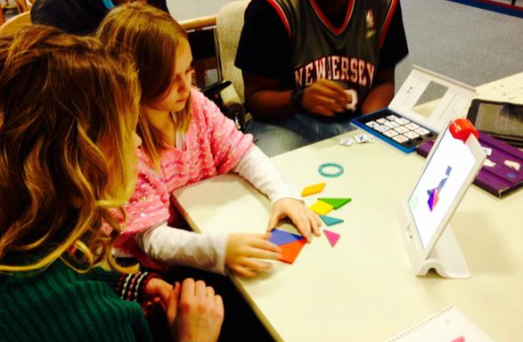
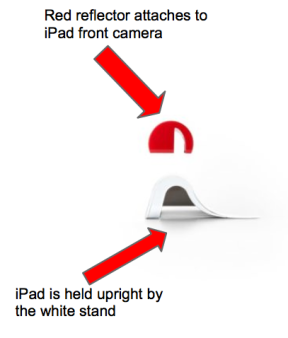 Osmo
Osmo


 pressing a key. Boys to the rescue!The following morning Barbie gives her sister her laptop and believes that it was her that fixed both laptops and not the boys. Following the return of the Skipper’s laptop, Barbie presents her cute puppy program to her teacher, who just so happens to be a woman. Barbie’s teacher is blown away by her work and gives her an A+ and even extra credit. Congrats Barbie, you’re clearly a computer engineer. Couldn’t write a program or fix two laptops but you drew a cute puppy and wore a cute top when you presented the game. So sure Barbie, you can be a “computer engineer”.


 educational lessons on a wide variety of subjects. There are currently thousands of
  is more math and science based, but it also contains other subjects such as English. There is also an SAT prep section similar to Khan Academy. Under the math and science sections there are many sub-categories containing many different courses. After clicking on a specific subject you will find yourself overwhelmed with pretty much any topic covered in that subject. After clicking on a topic you will find readings, videos, activities, and assessments. There is also a section that contains content that other teachers can add which is nice, but I recommend using these after going through everything else.
 OER Commons
 If you are still looking for more learning resources, please visit



 For example, one of my English teachers created a classroom Instagram account that she used to help us review vocabulary. We also used Instagram to complete creative homework assignments. My teacher would post a picture and tag a student. The student then had to comment and explain what vocabulary word coincided with the picture. This was a much more interesting way to do homework versus a standard worksheet or even a digital flashcard tool. The best part about this, from a student perspective, is that I could do my homework from my smartphone.