Showing posts with label #bpschat. Show all posts

Friday, October 25, 2013

Day 38 - GLOBAL READS: Inside Out and Back Again - Deb Dressler, Memorial School Principal

This post originally appeared on Principal Dressler's Blog

Memorial students participated in an interactive Global Read for the book, Inside Out and Back Again with author, Thanhha Lai. They got to meet the author and present their questions in a live web format. Ms. Lai is a first time author who has received many accolades, such as, Newberry Award, National Book Award and the MCBA (Massachusetts Children's Book Award). Students from Ohio, Oregon, Texas, Maine, and Illinois joined in the discussion. Thank you to Mrs. Olshaw for organizing this event.


Tuesday, October 22, 2013

Day 35 - To The Man I Met On The Bus Last Night - Lena Keown - BHS Senior

This post originally appeared in the BHS Collab - Burlington High's Literature Magazine

Here, in its entirety, is Lena Keown's poem, "To the Man I Met on the Bus Last Night," which was the winner of our 2013 poetry contest, which gathered over 50 submissions, our highest-ever total for anhy of our writing contests. Congratulations Lena!


“To the Man I Met on the Bus Last Night”
by Lena Keown
I didn’t mean to be rude, sir;
it is not that you,
yourself, frightened me,
for you were pleasant and kind.
You liked my hair, you said,
but your lips said you dreamt not
of tugging it salaciously,
malignantly.
You spoke of simple things;
you intimated no rage
nor lust
nor a ghostly heart.
In truth, I liked you;
you intrigued me,
and the cadence of your simple words
was light and warm.
I didn’t mean to be rude
when I turned from you:
I did it because they want me
to be weak,
to run without reason,
and what can I do?
I was alone and it was dark;
such effects weakness
in a woman,
they tell me.
I know you will not think of me;
I know you have not since I left.
But you will linger with me longer
than the smile of polite fear
that seized my face as I passed you,
for the last time,
and I tried to look at your eyes.

Friday, September 27, 2013

Day 19 - BHS Drama and Journalism Classes Causing Scenes - Callie Graham and Anne Ford, BHS English Dept.


Callie Graham and Anne Ford, teachers at BHS, recently collaborated on a Journalism project. Ford’s Drama class prepared scenes that might happen in a high school setting. They then performed them guerrilla-style, where the remainder of the class was caught off-guard. Then Graham’s Journalism students entered the room and had to conduct impromptu interviews of the bystanders, “victims,” and “administrators” to piece together the story. Drama students were able to work on fully engaging in a believable scene, while Journalism students honed their interviewing skills.

Ms. Graham’s plans for this year’s Journalism students is to bring back the paper copy of The Devil’s Advocate, and this exercise gave them some great, on-the-ground experience with how to interview subjects and how to “find the story.”

Check out more pictures from the event below!


Thursday, September 26, 2013

Day 18 - New Series for Parents of Young Learners - Tiffany D'Abbraccio and Naomi Abelson, Burlington Early Childhood Center


Welcome to the Burlington Public Schools Early Childhood Information Series!  We are excited for the opportunity to share information about early childhood development with you.  Our hope is that the sessions provide you with useful tools to understand the development of your child.  Here are the dates and proposed topics of each session:

October 10,2013 - Life Skills and Social Thinking Curricula
November 21, 2013 - Opening the World of Learning (OWL) Curriculum
December 12,2013 - Morning and Nighttime Routines in the Home
January 16, 2014 - Fine and Gross Motor Activities
February 6, 2014 - Reading to Your Child and Homework Routines
March 6, 2014 - Transitions to New Buildings and Classrooms
April 10, 2014 - Technology for Early Learners
May 22, 2014 - Fun Activities for the Summer

The sessions will be held in the School Committee Room, housed in Burlington High School.  Each session will begin promptly at 6:30pm, and will last approximately 1 hour.  We will also be available for questions after each session.  In order to ensure that the Information Series is useful to you, we ask that you please complete a brief survey.  This will help us better understand your family’s needs, and tailor the information sessions to topics that are relevant to you.  Please click on the link below to access the survey:

If you have specific questions pertaining to the the Information Series, please feel free to email Naomi Abelson and Tiffany D'Abbraccio at beccinfoseries@gmail.com.  You can also access useful information regarding the series by visiting the BECC Information Series blog at beccinformationseries.blogspot.com.  We look forward to seeing you on October 10th!

Tuesday, September 24, 2013

Day 16 - Write On - Melissa Parnell and Karen Hoyt, Pine Glen Kindergarten

This post by Kindergarten teacher Melissa Parnell and Instructional Assistant Karen Hoyt originally appeared on the Pine Glen Room 101 Blog.
Today we began journal writing!  It can be fun, challenging and little bit scary.  We did great!

Mrs. Parnell took some time to explain that when we write our letters have meaning and then she showed us some examples of what her writing might have looked like when she was a little girl.

We conferred with a classmate to discuss what we might like to write about.

No matter what letters and sounds we know we were all encouraged to try out best!  We also worked on illustrations to go along with our writing.


After recess we took some time to present our journals to one another.  Mrs. Parnell and Mrs. Hoyt were very proud of everyone.  Each student shared their journal entry with the class!


Now it is time to set goals for ourselves.  Each of our illustrations will match our words. Illustrations will have at least 5 colors and will include details like hands and feet on people.  We will try to leave at least two finger spaces between each word we write and we will try our best to write down all the sounds we hear in the words we are trying to write.

Monday, September 16, 2013

Day 10 - Trouble Remembering Passwords? - Jason Landry, BHS Senior

Thanks to BHS Senior Jason Landry for our first student post of the year! You can follow Jason and the work of his BHS Help Desk Classmates on the Burlington High School Help Desk Blog.

You can also follow our BHS Help Desk on Twitter - @BHSHelpdesk
If you are like most BHS students, you are using many different apps and digital tools and have a lot of different passwords to remember. Since school started, one issue we have encountered quite often in the Help Desk is students forgetting their passwords. As a result of this I decided to research 3 different password apps. Why download one of the three apps I’m suggesting?
1. They will keep you organized
2. They are simple to use
3. You’ll become a more responsible student
4. They are free
5. You’ll never forget a password again
These apps are ways to stay organized with your accounts for all different purposes, they are good for students, teachers, and others in the business world. These apps are available for iPads, iPhones, and iPods.
PASSWORD KEEPER:
The first app I found was Password Keeper.
With Password Keeper you need to set one 
keeper-osx-100044569-large
master password to protect all your other passwords. Then, you create an account with your email, and you can chose to create a security question. You can tap the right corner of the screen to add your password and what account that password belongs to, and you can also add a description. The password and account are put into alphabetical order depending on the name of which the password belongs to. This app is good for keeping multiple passwords and combinations to different places, such as a gym locker, all in one place. Important tip: You must remember the master password.
iPASSWORD:
The second app is called iPassword and it is very similar to the app Password Keeper.mzl.scdlsnox.175x175-75You have one master password on this one as well and you can back it up to your email so if you forget the master password it is still sent to your email. This app has multiple tabs with places where you may save your passwords. The first tab is logins, then wallets, accounts, and other. Logins are for social networking sites, wallets are for accounts you might have at a bank, memberships or identification numbers and etc., accounts are for things like iTunes or database accounts. The last tab is for “other accounts” not provided in the other tabs. On any of the tabs you click the right hand corner which is a “+” and add your password and it gets set up in a list in one of those tabs. This is very helpful if you don’t remember your passwords. This keeps your accounts extremely organized.
PASSWORD MANAGER:
The last app I found was Password Manager. This app is very similar to the other two apps  but this one is extremely simple. You still have a master password and there are 5 sections to chose from to classify where your passwords belong. You can also back up your passwords so they are remembered on your computer as well from this app. This app is very helpful for those looking for a simple way to store passwords.
images
These are all helpful apps to the everyday life of a digital citizen. As a digital citizen it is important not to share your passwords with anyone or anything (Spam) that you can’t trust, especially if that password is protecting something important. Make sure you have multiple passwords that are creative don’t use the same password to often.
Keeper pic

Friday, September 6, 2013

Day 4 - Why The Three Little Pigs Is A Perfect Story In High School History Class, Michael Milton, BHS History Dept.


Mr. Milton, BHS History Dept.

This is a BPS Blog original from Michael Milton - Mike also blogs regularly one his own blog here

You can also follow Mike on Twitter - @42ThinkDeep

While it may seem childish to start a high school social studies class with the story of the Three Little Pigs, I am really glad that I did! In social studies we are not simply focusing on the facts that make up the past, but looking at events and movements from a variety of perspectives. We are playing with concepts like bias and validity. 

When class began, I asked the class to tell me about the three little pigs and the big bad wolf. While one person took the role of the storyteller, others joined in to help when the storyteller needed it. When we got to the end of the story, I told them that that was simply one point of view. I proceeded to read to them The True Story of The Three Little Pigs, which is from the wolf's point of view (turning the story on its head). From the wolf, we learned about his motive for going to his neighbors house - he was looking for sugar to bake a cake for his grandmother's birthday. And his blowing the houses down wasn't malicious, he had a cold which caused him to sneeze!

As we unpacked the story, the conversation went from the simple "what were the differences in the stories?" to the more complex "what sources can we turn to to verify first-hand accounts?". At points in class, it felt a bit like we were on Law and Order trying to prove a case. This activity was followed by looking at two perspectives on the Stamp Act in my US History class and two perspectives on human nature in my World History classes. In both, we asked similar deep questions as we did with the Three Little Pigs.

Eventually we will move from simply being able to identify bias to constructing narratives based on several sources and I am certain that this activity will have helped propel us along the way.
Enhanced by Zemanta

Thursday, September 5, 2013

Day 3 - If You’re Going to Use iPads With Kids, You’ll Have to Know This Trick, Ben Schersten, Francis Wyman IT Specialist


Okay, I admit it. I make mistakes. And I love the “undo” command. You know, command+z in OS X and ctrl+z in Windows.

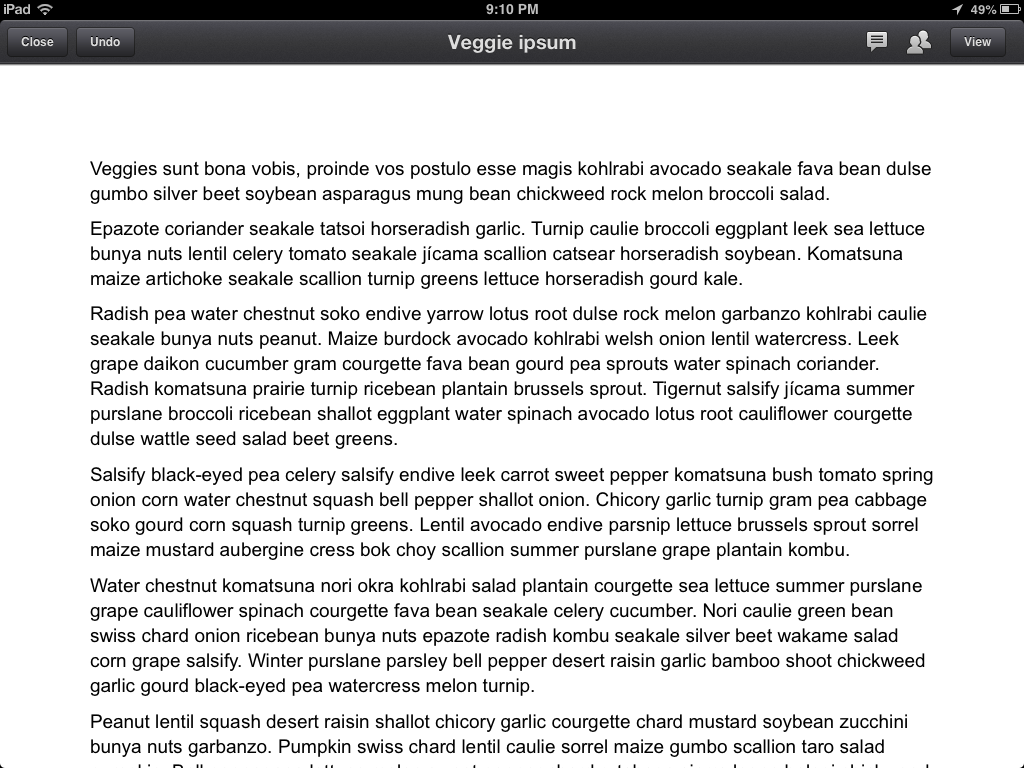
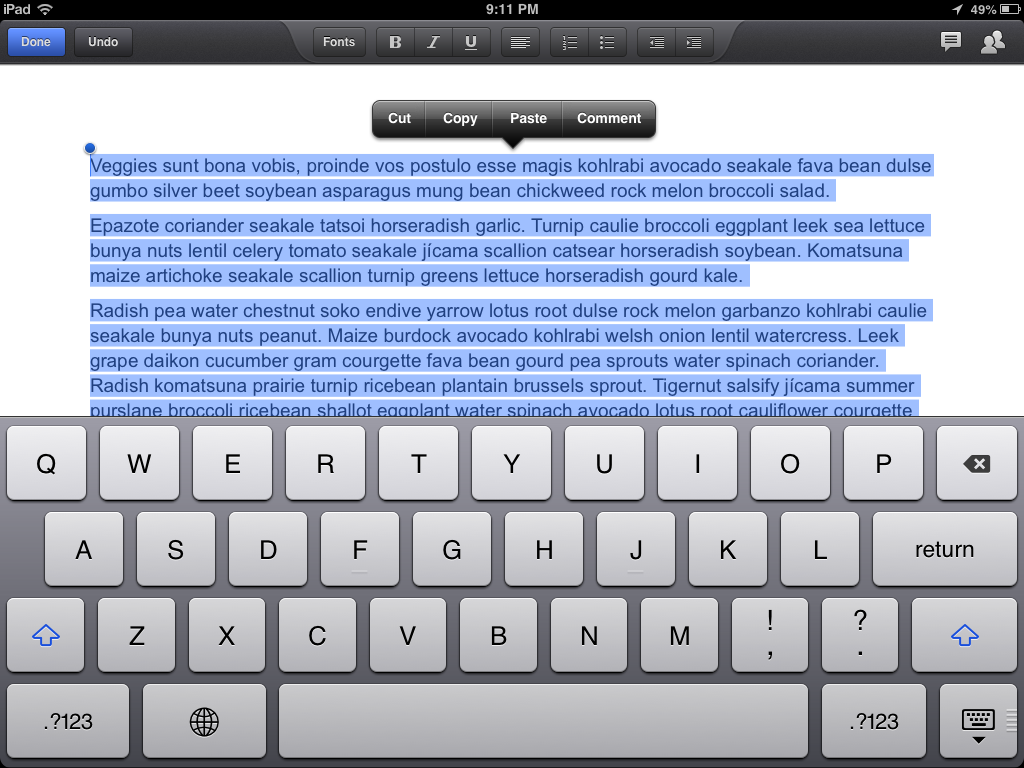
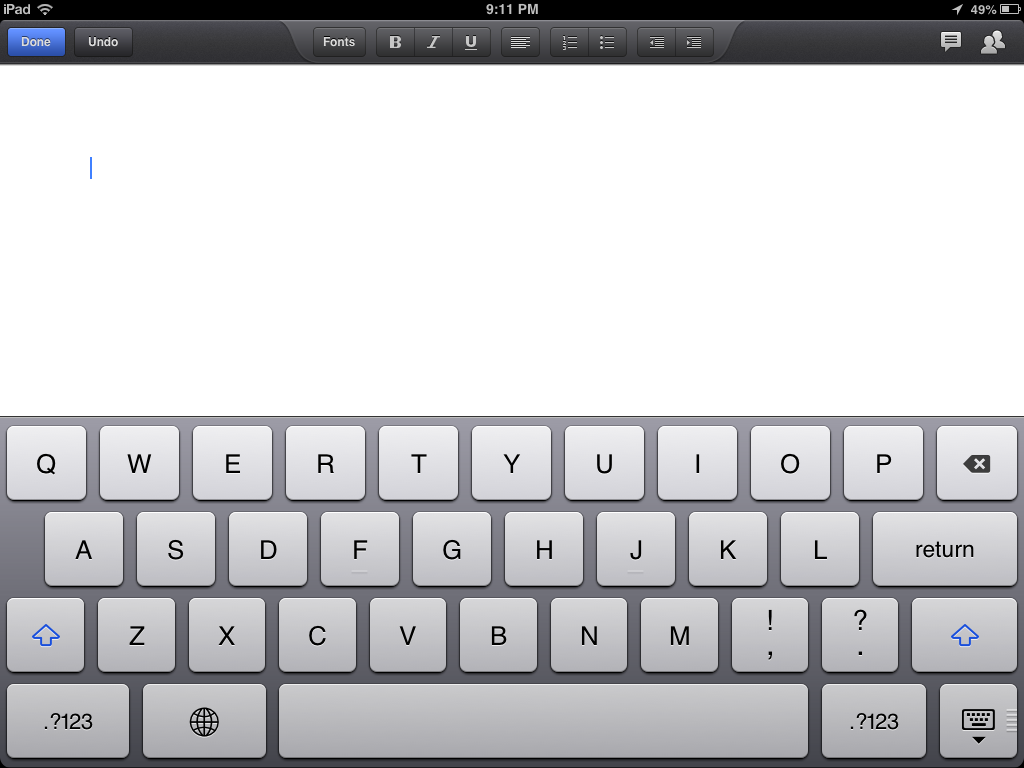
And if you’ve ever worked with kids you know they make mistakes too. There they are, writing away when somehow they manage to select a paragraph or two (or maybe they “select all”) and accidentally bump the delete key… oops.
Some text…

Selected…


And deleted…


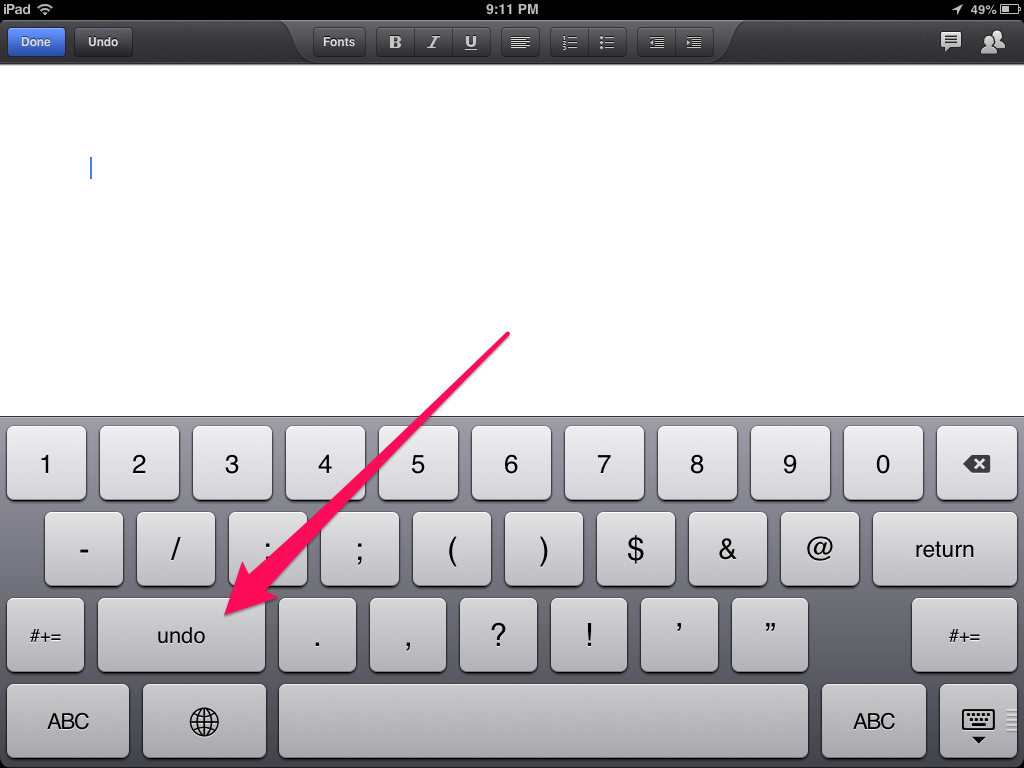
Oh no. This is an iPad; there’s no command+z. But… there is an undo button. With the traditional keyboard up, tap the “.?123″ button to bring up the secondary keyboard. There, on the left is the “undo” button.


Google Drive and Pages both have their own undo buttons (up top on the left, did you notice those in the screenshots?) but this works everywhere. Evernote, Notes, etc. Anywhere you enter text.
So, the next time your students lose a paragraph of work (or more), you can help them get it back.
Sadly, the undo button is not present on the iPhone.
——-
photo credit: llauren via photopin cc
For those out there that noticed the Lorem Ipsum text in the screenshots, the Veggie Ipsum generator I used is here. For the meat-lovers, try Bacon Ipsum.


Enhanced by Zemanta